Showing posts with label Windows 7. Show all posts

Thursday, September 10, 2009

Compare Snow Leopard and Windows 7

Two new operating system of Apple and Microsoft are equipped with features attractive to conquer the Windows PC and Mac.
> Good and bad in Windows 7.


New version of Mac OS X, codenamed Snow Leopard (Snow Leopard), customers have come to hand last week. Windows 7 will appear in the reseller on 22/10.


Finder file management tool of the Snow Leopard and Windows Explorer 7 interface very similar to the search bar at the top right.


Windows 7 has an additional feature acclaimed: Libraries. Here, users can view files with the same features (music, video, photos, documents ...) are stored on hard drives scattered, like a photo placed in the My Pictures folder and Public Pictures ...


Snow Leopard without Libraries and features could be the nearest comparison is Smart Folders contain search results (Windows 7 also has this feature).


Two operating systems allow large icon set. Windows 7 supports one icon to 256 x 256 pixel still Snow Leopard up to 512 x 512 pixels.


If you right-click an icon in the Dock of OS X, users will read the specific information related to the application. Taskbar of Windows 7 has also been improved to bring similar capabilities, called Jump Lists, but supports many more operations.


Snow Leopard includes tools such as Quick preview content Look, Cover Flow, or the basic icon. In addition, when mouse over a file icon on the 64 x 64 pixel, users will see the preview button/playback (if it is audio or video file will have the Play button)...


In Windows Explorer of Windows 7, select a file and content preview (preview) will appear in the table on the right. Compared with Snow Leopard, Windows 7 looks "rustic" but still useful.


A more interesting feature in Windows 7 is Aero Peek, the ability to change window into transparent. In OS X, feature Show Desktop of Exposé will last all the windows from the screen by only one button.

Photos: VNexpress.

Share/Save/Bookmark

“Make up” cho Windows 7 với theme ẩn sẵn có

Vài mẫu theme đẹp sẵn có trong Windows 7 nhưng không hiểu sao Microsoft lại cố tình “ẩn” chúng đi. Vài thao tác đơn giản có thể giúp "lôi" chúng ra để làm mới giao diện vốn chẳng khác gì Vista.


Đầu tiên, bạn truy cập vào My Computer, click chọn Organize ở góc trên cùng bên trái và chọn tiếp Folder and Search Options ở menu hiện ra.


Tại cửa sổ Folder Options, bạn chọn tab View. Trong danh sách tại mục Advanced Settings, đánh dấu vào mục Show hidden Files và bỏ chọn ở mục Hide protected operating system files (Recommended). Bấm OK để tiếp tục.


Tiếp theo, quay trở lại cửa sổ My Computer và tìm đến thư mục theo đường dẫn: C:\Windows\Globalization\MCT\. Bạn sẽ thấy trong thư mục MCT sẽ có 5 thư mục con khác với tên MCT-XX (Trong đó XX là các ký tự AU, CA, GB, US hoặc ZA).

Truy cập vào 1 trong 5 thư mục này để kích hoạt kiểu giao diện ẩn bên trong chúng bằng cách click đôi vào file XX.theme có bên trong đó. Một khi kiểu theme đã được kích hoạt, chúng sẽ được lưu lại trong tùy chọn Personalization và bạn có thể dễ dàng sử dụng chúng như cách thay đổi theme thông thường.

Bây giờ, truy cập lại cửa sổ Folder Options như bước 1, 2 hướng dẫn ở trên, chọn tab View và nhấn vào nút Restore Default để khôi phục lại các thuộc tính mặc định của Windows.

Sau khi đã kích hoạt cả 5 theme trong 5 thư mục theo hướng dẫn ở trên, sẽ có thêm 5 giao diện mới để bạn lựa chọn nếu muốn thay đổi “bộ mặt” của Windows 7.


Cách thức thay đổi giao diện:

Để thay đổi giao diện cho windows khá đơn giản, tuy nhiên không phải ai cũng biết cách thực hiện. Sau đây là các bước tiến hành:

Tại màn hình desktop, bạn click chuột phải vào một vùng trống bất kỳ và chọn Personalization.

Tại cửa sổ hiện ra tiếp theo, bạn chọn mục Theme, và cửa sổ Theme Settings sẽ xuất hiện để bạn chọn kiểu giao diện sao cho ưng ý nhất. (Trong này sẽ bao gồm cả 5 mẫu giao diện mà bạn đã mở khóa được ở trên).

Hy vọng, với thủ thuật đơn giản này, bạn có thể tìm được thêm cho mình giao diện phù hợp nhất.

Dân trí.

Share/Save/Bookmark

Một vài phím tắt trong Windows 7

* Win+Home: Clear all but the active window.
* Win+Space: All windows become transparent so you can see through to the desktop.
* Win+Up arrow: Maximize the active window.
* Win+Down arrow: Minimize the window/Restore the window if it's maximized.
* Win+Left/Right arrows: Dock the window to each side of the monitor (If you've got dual monitors, adding Shift to the mix (e.g., Win+Shift+Right arrow) will move the window to the adjacent monitor).
* Win+T: Focus and scroll through items on the taskbar.
* Win+P: Adjust presentation settings for your display.
* Win+(+/-): Zoom in/out.
* Shift+Click a taskbar item: Open a new instance of that application.

Share/Save/Bookmark

Một vài thủ thuật với windows 7

Như các bạn đã biết windows 7 ra đời đã thu hút được sự chú ý rất lớn của mọi người.Trái lại với người anh em vista , windows 7 nhẹ nhàng hơn, giao diện bắt mắt hơn, tiện lợi hơn.... và đi kèm với nó có khá nhiều thủ thuật tùy chỉnh.... Bài viết này thực ra là tổng hợp nhiều bài khác nhau mà mình đã đọc được.

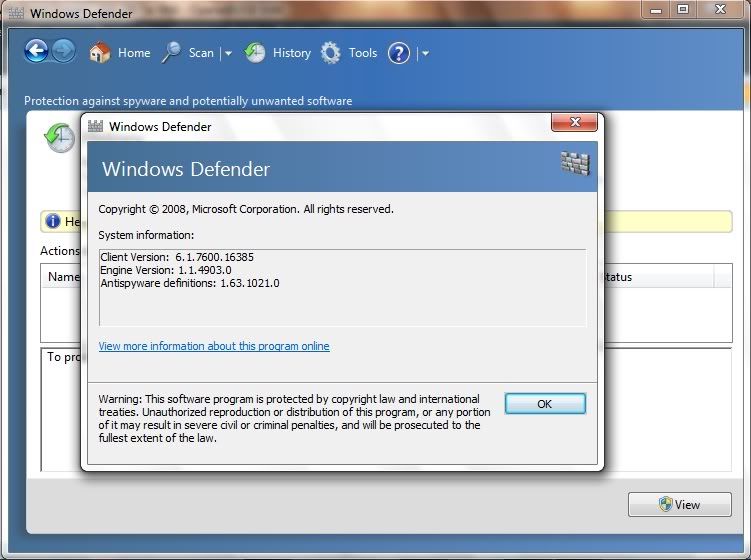
Tắt hẳn Windows Defender


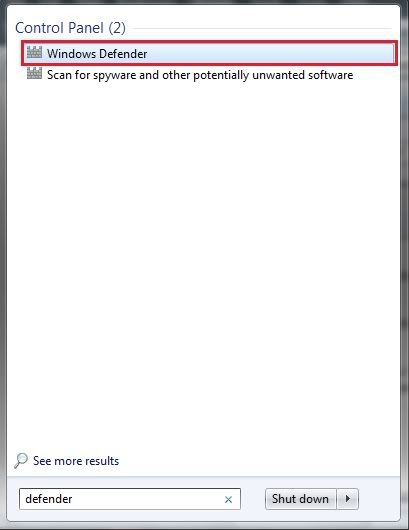
1. Để mở Windows Defender lên bạn có thể làm như sau:
Vào Start, trong khung Search bạn gõ vào defender và chọn lựa chọn Windows Defender như trong hình:


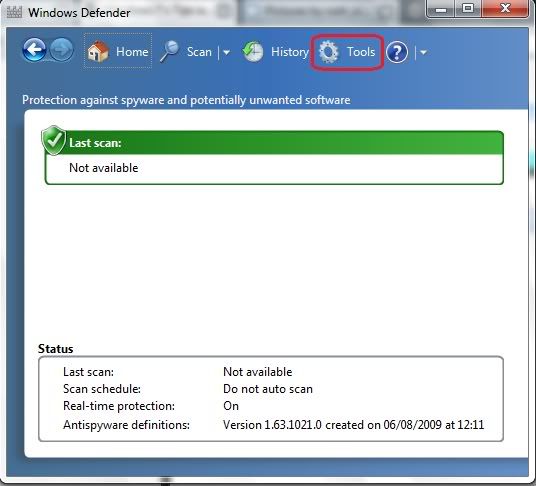
2.Khi Windows Defender đựoc bật lên trên Menu bạn chọn tab Tools.


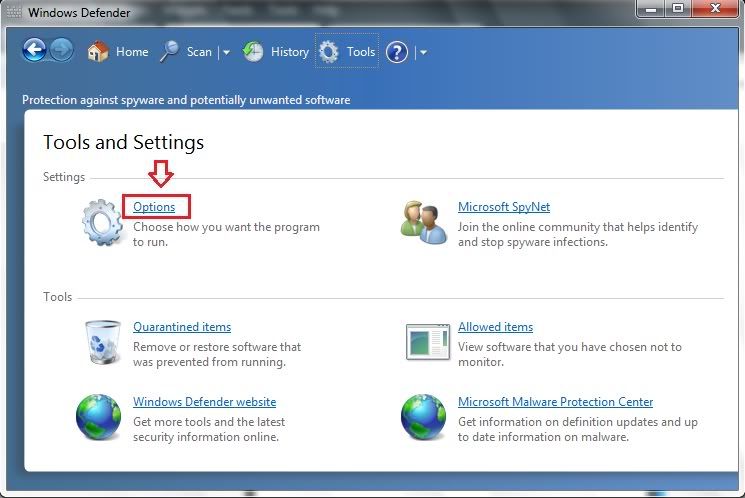
3.Chọn Options:


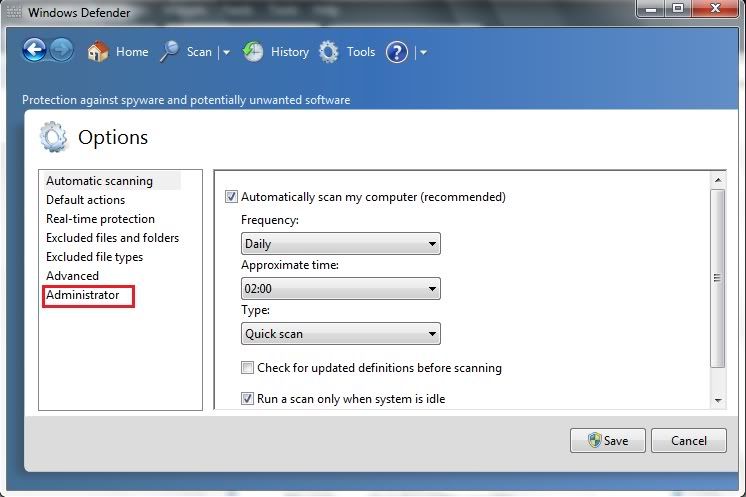
4.Chọn Administrator


5.Bỏ dấu tick trước tùy chọn : Use this program và nhấn Save:


6.Click Yes để chấp nhận trong cửa sổ UAC hiện ra:


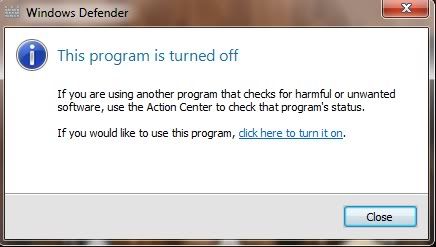
7. Một cửa sổ thông báo chương trình đã tắt.Nhấn close để đóng của sổ:


8. Kiểm tra trong Windows Task Manager, thấy rõ chương trình đã tắt:


Disable Aero Shake in Windows 7
Bạn biết rằng Windows 7 có tính năng Aero Shake (lắc cửa sổ). Để hiểu rõ thì bạn xem clip này:


Cách thứ nhất: Sử dụng Group Policy Editor

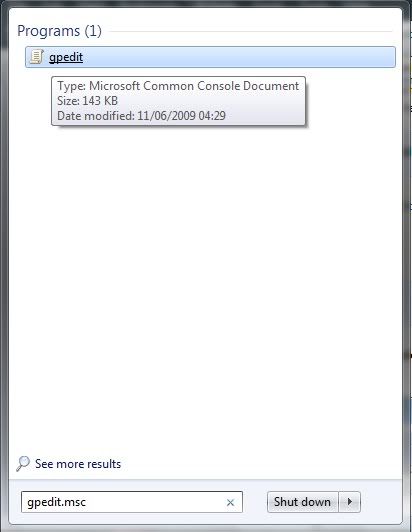
1.Vào Start trong khung Search bạn gõ vào gpedit.msc và chọn như hình:


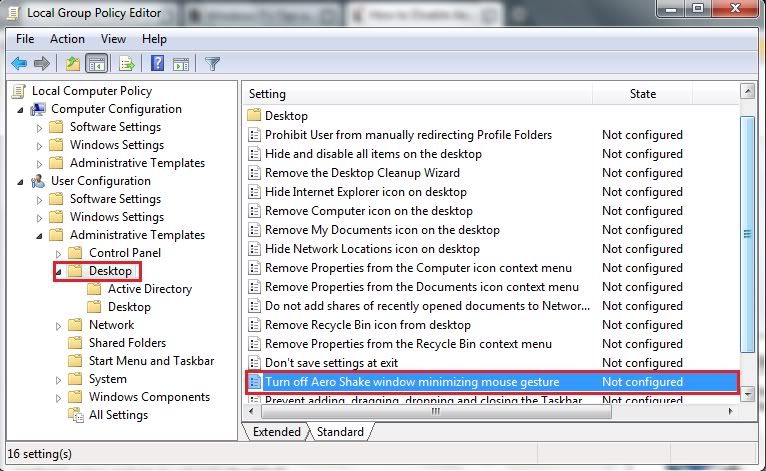
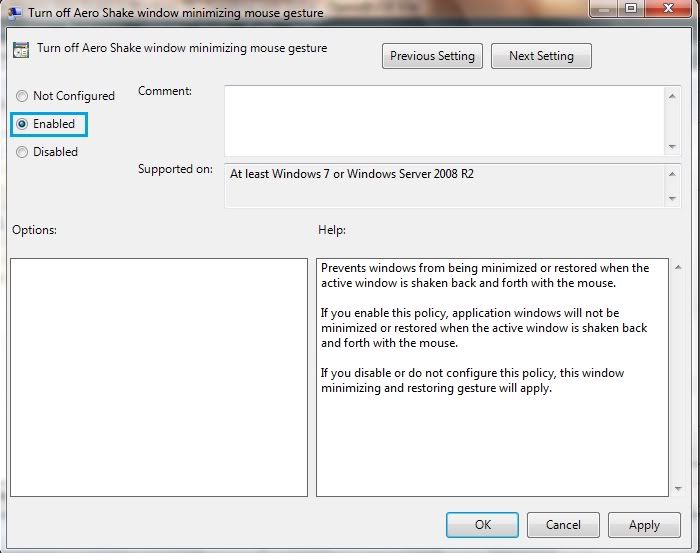
2. Ở khung bên trái bạn chọn Administrative Templates -> Desktop. Khi ấy sẽ thấy dòng Turn off Aero Shake window minimizing mouse gesture ở khung bên phải:


3. Nháy kép vào Turn off Aero Shake window minimizing mouse gesture ta được một cửa sổ mới. Bạn tick chọn Enable -> apply ->> OK.


Cách 2: Sử dụng Registry Editor.

1. Start -> Run , gõ: regedit -> Enter .

2. Tìm theo nhánh key sau:
HKEY_CURRENT_USER\Software\Policies\Microsoft\Windows


3. Bạn hãy tạo thêm môt key cho nhánh này , với tên là :Explorer và có dạng như hình sau:


4. Bây giờ thì nhìn qua khung bên phải , click chuột phải và tạo một key mới : với thông số như sau:
Name: NoWindowMinimizingShortcuts
Value: 1
Format: 32-bit DWORD


Hoặc đơn giản hơn bạn down cái này về, giải nén và chỉ việc chạy thôi: http://www.mediafire.com/?mnymdkydx0z. Restart or log off. Bây giờ bạn tha hồ lắc mỏi tay mà ko thấy gì.


Download nhiều hơn cho IE 8
Cái này dành cho những ai trung thành với IE8. Mặc định IE 8 chỉ cho phép download tối đa 6 files một lúc.Tuy nhiên bạn muốn download nhiều hơn.Vậy hãy làm theo cách sau.

1. Vào Start -> Run (hoặc trong khung search) , gõ: regedit.

2. Tìm theo nhánh sau:
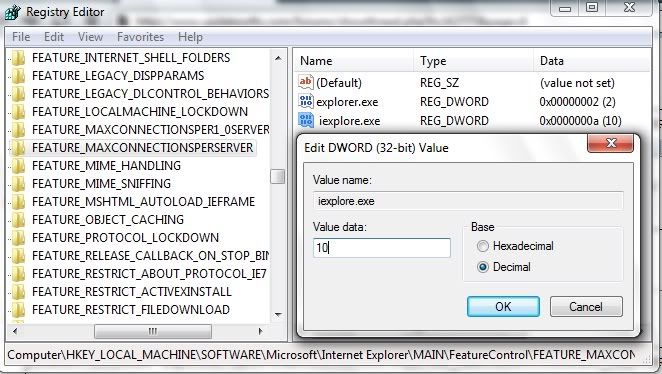
HKEY_LOCAL_MACHINE\SOFTWARE\Microsoft\Internet Explorer\MAIN\FeatureControl\FEATURE_MAXCONNECTIONSPERSERVER

3. Trong cửa sổ bên phải , bạn click chuột phải vào khoảng trắng New > DWORD Value và cho các thông số như sau:
Name: iexplore.exe
Value data: 10
Base: Decimal


4.Làm như bước 3 nhưng đối với nhánh:
HKEY_LOCAL_MACHINE\SOFTWARE\Microsoft\Internet Explorer\MAIN\FeatureControl\FEATURE_MAXCONNECTIONSPER1_0SERVER

Share/Save/Bookmark

Monday, September 7, 2009

Sony showed up laptop Vaio X and Xperia X2 phone

Laptop 11.1 inch screen weighs less than 0.7 kg and the second generation smartphone Xperia X1 launches in consumer electronics exhibition IFA Berlin 2009.

Vaio X latest version is only about 1.3 cm thin, 3G wireless connectivity and battery life time of the day. Japanese electronics firms do not disclose product configurations (models on display at the fair for Windows 7 and Intel Atom CPU can change). Sony also has an agreement with Google to make Chrome the default browser in the Vaio line.

Sony Vaio X Pictures.

Video Vaio X at IFA.

At the same day, Nokia launches N97 Mini and X series, Sony announced Xperia X2 equipped with Windows Mobile 6.5. Equipment sold in the first quarter IV/2009 (price not announced), there are two black and silver, 3.2 inch touch screen 480 x 800 pixels, QWERTY keyboard, 8.1 megapixel camera, TV port connection, Wi-Fi, Bluetooth and GPS.

Images of Xperia X2.

Xperia X2 Introduction Video.

CEO Howard Stringer of Sony said they are focusing on developing products based on 3D technology. "There are still many issues to be resolved but obviously 3D technology is becoming universal in a near future", said Stringer.

Share/Save/Bookmark

Wednesday, September 2, 2009

Errors of Windows 7

Organized open source software (FSF) is opening a campaign against the latest operating system from Microsoft and called it a "danger" to the user.


FSF calls user turned against Windows 7.

Website Windows7Sins.org, FSF listed seven "sin" of Windows 7 the "poisoned" education, threatening the safety of users of the security risk, misuse of standard, proprietary, bound users, violate individual rights and Windows 7 is becoming a platform DRM (Digital Rights Management - Managing digital rights, prevent people to copy entertainment content).

FSF is an organization formed for the law open source GPL, is the most open source software, including Linux. They have sent letters to companies in the Fortune 500 list, explaining that the company will benefit the emotional, technical and financial resources if the switch from Windows and Office to open source solutions like Linux and OpenOffice.org.

Richard Stallman was founded in the mid 80th century, FSF believes that free software is worth praising and suppliers are considered commercial software, proprietary like Microsoft, Adobe System, Apple... as "enemies".

Microsoft declined to comment on the campaign.

Share/Save/Bookmark

Wednesday, August 26, 2009

Nokia enters netbook market with Booklet 3G

After 25 years leading oil phone field production, this week Nokia stir world computer already very crowded mini-laptop with a 10.1 inch high-resolution support with battery life up to 12 hours.

More photos Booklet 3G.

Booklet 3G has aluminum casing, only about 2 cm thin and weighing 1.25 kg. Besides Atom processor, the device has full features that users can expect from a phone company as 3G/HSPA wireless, Wi-Fi, service pack Ovi ...

"More and more people want their computers, compact and easy to carry over," Kai Oistamo, vice president of the array of Nokia devices, said. "The Nokia joined the field with Booklet 3G is a natural step to develop and we will bring to the strength in your phone as long battery life, design and connectivity.

Nokia's mini-laptop running Windows 7, a HDMI port, in front of the camera supports video conversations, Bluetooth, SD card reader and A-GPS positioning technology.

Configuration details of products, present on the market and price will be Nokia announced two ninths. Apple is also said to be developing a device mini, netbook can be a computer or tablet form of tables. With the introduction Booklet 3G, Nokia has quick feet over U.S. technology firms. View video demonstration Booklet 3G.

A survey of early VnExpress.net shows to nearly 60% of participants believe Nokia will be the laptop of fun and food products, while 22% of visitors think that the Finnish company should focus on developing the device than.

Share/Save/Bookmark

Một số điểm hay và dở trong Windows 7

Hệ điều hành mới nhất của Microsoft không hoàn hảo nhưng đã khắc phục những hạn chế và thực hiện được nhiều điều mà Vista chưa làm được.
> Hình ảnh Windows 7 RTM.


Windows 7 không còn một số ứng dụng như Photo Gallery, Movie Maker, cũng không được đặt tên riêng như Vista, Experience (XP), Millennium... mà đơn giản chỉ là 7 (bản Windows thứ 7). Tuy nhiên, điều đó cũng cho thấy hệ điều hành này sẽ hoạt động đơn giản, không quá hào nhoáng và không gây khó chịu cho người sử dụng. Nó được thiết kế để giúp mọi người hoàn thành công việc dễ dàng hơn.

Một trong những điểm đáng tiếc ở Vista là môi trường Aero đòi hỏi cấu hình quá cao khiến nhiều máy tính không thể chạy trơn tru. Trong khi đó, Windows 7 hoạt động ổn định trên đa số các hệ thống từng được được thử nghiệm, kể cả netbook. Taskbar được thiết kế lại.

Taskbar gần như không thay đổi từ Windows 95, nhưng trong bản 7, nó đã được thiết kế lại dưới dạng ribbon và bổ sung khả năng duyệt trước (thumbnail preview) để người dùng có cái nhìn sơ lược nội dung bên trong. Tính năng Jump Lists cho phép bấm chuột phải để truy cập một tác vụ liên quan đến ứng dụng cả khi ứng dụng đó chưa được mở ra. Công cụ quản lý System Tray.

Khu vực System Tray (khay hệ thống) ở góc phải cuối màn hình không còn những nhắc báo liên tục hiện ra gây phiền toái cho người dùng nhờ công cụ quản lý thuận tiện.
Libraries.

Một công cụ khác được giới chuyên môn ca ngợi là Libraries (Thư viện ảo). Bao năm qua, Microsoft cố "đào tào" người dùng lưu trữ file cá nhân ở khu vực có tên My Documents. Nhưng rất nhiều người tảng lờ folder này và đặt các tệp tin "vô tội vạ". Tính năng Libraries với folder ảo về tài liệu, nhạc, ảnh, video... sẽ gom các file có chung đặc tính đang nằm rải rác trên ổ cứng vào folder ảo đó để người sử dụng có cái nhìn tổng thể. Ví dụ, Pictures Library tập hợp và hiển thị mọi ảnh đang được lưu ở chục khu vực khác nhau (trên desktop, trong My Documents, trong folder "ảnh sinh nhật" ở ổ D...).

Tuy nhiên, nhược điểm của Windows 7 là công cụ Windows Update vẫn đòi hỏi người sử dụng phải tắt máy (shut down) mới có thể cập nhật được các bản vá lỗi.

Ngoài ra, nếu muốn chuyển từ XP lên Windows 7, họ sẽ phải cài lại toàn bộ các ứng dụng và thiết lập lại chế độ settings, thay vì đơn giản "nâng cấp" như từ Vista lên bản 7.

Share/Save/Bookmark

Microsoft demos Windows 7 at WITFOR 2009

Worldwide IT Forum was first held in Vietnam from 26 to 28 / 8, the U.S. software vendor plans to introduce new features and tricks or Windows 7 to the user in the country.
> WITFOR '09 opened opportunities to connect enterprise IT to VN / A number of points and bad in Windows 7.


Ms. Cong Nam Phuong, in charge of product marketing Windows Client Microsoft Vietnam, said that although information about the product have been posted widely on the media, and the witnessed the implementation of action with the new operating system will surely much more interesting.


Content performance, including the operations of tools to help connect wireless easy, how fast and safe web surfing with IE8, set power saving mode, find documents, quickly look at the background, divided read file sharing and multimedia (multimedia) from another computer ... HP representatives will introduce the program to upgrade from Windows 7 operating system is in Windows Vista.

Also at WITFOR 2009, Microsoft Vietnam will launch the Live @ edu, e-mail service free of charge to universities with the domain name (domain) of the school. Each mailbox has 10 GB of storage space and users also have more 25 GB space to save documents online. Live @ edu is one of Microsoft's activities to support education in Vietnam.

Forum information technology world WITFOR (World Information Technology Forum) was first held in Lithuania in 2003. Event two years this continued to be host Botswana in 2005 and Ethiopia in 2007.

WITFOR 2009 will last for 3 days 26-27-28 / 8 at the National Convention Center Hanoi, is expected to welcome over 1,500 delegates are leading the technology group, experts in the industry from over 70 countries.

Share/Save/Bookmark

Saturday, August 22, 2009

Windows 7 is free for use in 4 months

Microsoft confirmed the user can install and experience the new operating system within 120 days without activation key imported products.

Often, after installation, the operating system will work as it has been activated within 30 days. However, once a day (from 4 th to 27), notice will appear on the screen asking the user to enter. The 28 and 29, this dialog box appears cycle 4 hours / week on the last time, the system will "remind" hours.


However, when typing "slmgr-rearm", users will reset the clock countdown to Windows 30 additional days. They can exploit this procedure up to three times, bringing the total to 120 days free.

The steps:
- Select Start, right-click Computer and select Properties. End table is the number of days remaining in the 30-day trial period.
- When this number is close to 0, select Start -> All Programs -> Accessories, right-click Commant Prompt and select Run as Administrator, enter password admin.
- Type slmgr-rearm (space between slmgr and seals -) and press Enter.
- Restart Windows 7.

Today is the deadline for Microsoft to load Windows 7 RC. Official version of Windows 7 will be sold from October 22 while the code is sent to manufacturers (Windows 7 RTM) was leaked on several peer sharing website.

WindowsSecrets. (Photo: vnexpress).

Share/Save/Bookmark

Saturday, July 25, 2009

Windows 7 has improved

Microsoft confirmed the code for the software operating system 7 has been passed last start and was sent to the manufacturers to prepare for launch on 22/10/2009.

This is the Build 7600.16385 was leaking on a website to share some today. Windows 7 is based on similar architecture Vista but many additional features and new features to the operating system look good and work more effectively.

Microsoft hopes Windows 7 will be received positively than what took place with Windows Vista. Vista operating system several times but was delayed when the eyes are still not harm the user. Meanwhile, the 7 is right on and the trial value.

Software Group USA will release Windows 7 with many different versions from cheap Starter Edition to Ultimate Edition high. However, employers argue that this people will buy up to Home Premium or Professional.

Share/Save/Bookmark

Sunday, July 12, 2009

Sức mạnh đằng sau những netbook thế hệ mới

Tuần này, Intel công bố Atom thế hệ hai, Acer giới thiệu netbook và nettop trên nền tảng Nvidia Ion, Hewlett-Packard xuất xưởng Pavilion dv2 sử dụng chipset AMD Neo, cho thấy thị trường netbook sẽ "lột xác" trong năm nay.

Hãng nghiên cứu Gartner dự đoán khoảng 21 triệu netbook sẽ được tiêu thụ năm 2009, tăng gấp đôi năm ngoái. Dòng sản phẩm này cũng sẽ mở rộng kích thước và bổ sung nhiều tính năng hơn nhờ sức mạnh đến từ các nền tảng điện toán của Intel, AMD, Nvidia...

Intel Atom hỗ trợ Windows 7

Z550 là bộ vi xử lý Atom mới với xung nhịp 2 GHz và công nghệ siêu phân luồng, tăng hiệu suất đồ họa và đa nhiệm. Dù máy tính tích hợp chip này chưa được công bố, giới quan sát dự đoán hệ thống đầu tiên sẽ xuất hiện ngay cuối năm 2009. Intel cũng khẳng định Atom thế hệ mới sẽ hỗ trợ ít nhất 2 trong 6 phiên bản khác nhau của Windows 7.

Khả năng đồ họa của Nvidia Ion


Chiếc desktop mini AspireRevo của Acer là sản phẩm đầu tiên dùng nền tảng của Nvidia, hứa hẹn mang đến "đồ họa siêu việt" so với những nettop (PC nhỏ, giá rẻ) đang có mặt trên thị trường. AspireRevo sử dụng chip Intel Atom N230 1,6 GHz, Nvidia GeForce 9400M GPU và công nghệ CUDA. Hệ thống nhỏ như một cuốn sách bìa cứng nhưng có thể trình diễn video 1080p và DirectX 10.

Chip giá rẻ AMD Athlon Neo


Trong khi đó, AMD coi Neo là một bước tiến dài về hiệu suất so với Atom thế hệ đầu. Chiếc máy tính mới trình làng HP Pavilion dv2 màn hình 12 inch với chip Neo được trang bị RAM 4 GB, ổ cứng 320 GB, đồ họa rời ATI Radeon HD 3410 bộ nhớ 512 MB nhưng chỉ có 749 USD - cao hơn một chút so với netbook đắt nhất nhưng thấp hơn phiên bản laptop thời trang gây nhiều tranh cãi Sony Vaio P.

Via Nano đã sẵn sàng

Công ty Via cũng tuyên bố họ đang nắm giữ 10-15% thị trường netbook và dòng Via Nano tốc độ 1,3 GHz sẽ sớm có mặt trong hệ thống netbook Samsung NC20 màn hình 12 inch.

Lê Nguyên theo http://vnexpress.net/GL/Vi-tinh/2009/04/3BA0DCE1/

Share/Save/Bookmark

Wednesday, July 1, 2009

Khám phá những điểm nổi bật của Windows 7

Latika, kỹ sư tại Microsoft, xuất hiện trong một số video tương tác để giới thiệu cho người xem cách thức hoạt động của hệ điều hành Windows thứ 7.

Người dùng có thể mở ứng dụng, tài liệu bằng cách gõ tên chương trình hoặc từ khóa vào thanh tìm kiếm ở Start menu. Họ cũng tùy biến Windows dễ dàng hơn.

Họ có thể thu nhỏ cửa sổ bằng cách kéo-thả cửa sổ đó về lề phải hoăc trái màn hình. Khả năng hiển thị nội dung dưới dạng thumbnail cũng hỗ trợ mở đúng ứng dụng nhanh chóng.

Windows Media Center đẹp mắt, khoa học và bổ sung nhiều tính năng hơn khi xem phim, nghe nhạc...

Công cụ điều chỉnh mức tiêu thụ điện năng linh hoạt giúp thời lượng pin laptop dài hơn.

Share/Save/Bookmark

Windows 7 đón nhận thành công đầu tiên

Chương trình giảm giá của Microsoft dành cho những ai đặt trước gói sản phẩm Windows 7 đang rất hút khách với 30.000 bản được tiêu thụ trong 1,5 ngày tại Nhật.

Người đặt mua bản nâng cấp từ Windows XP hoặc Vista lên Windows 7 tại Mỹ chỉ phải trả một nửa so với giá gốc, trong đó Windows 7 Home Premium chỉ còn $50 và Windows 7 Professional là 100 USD. Chương trình này kéo dài đến 11/7 với số lượng giới hạn (Microsoft không tiết lộ cụ thể) và khách hàng sẽ nhận sản phẩm vào 22/10.

Windows 7 Home Premium hiện không những được đặt mua hết tại Nhật mà còn đứng đầu kho phần mềm trên Amazon.com, đồng thời là phiên bản bán chạy nhất trong danh mục sản phẩm điện tử trên website này. Windows 7 Professional cũng theo sát ở vị trí thứ hai. Danh mục phần mềm bán chạy trên Amazon.

Lenovo vừa tuyên bố sẽ cung cấp Windows 7 miễn phí cho người mua laptop hoặc desktop PC cài Vista của họ từ 26/6/2009 đến 31/1/2010. HP công bố kế hoạch tương tự vào tuần trước và dự kiến các công ty máy tính lớn khác cũng sẽ thực hiện chương trình này nhằm thuyết phục người tiêu dùng không nên trì hoãn việc mua máy tính mới đến 22/10 - thời điểm Windows 7 ra đời.

Lê Nguyên theo http://vnexpress.net/GL/Vi-tinh/2009/06/3BA10B63/

Did you know Microsoft has already announced Windows 7 prices?

Share/Save/Bookmark

Monday, June 29, 2009

Windows 7 can be distributed through USB

Microsoft is considering selling their new operating system Window 7 through USB driver for users to easily upgrade for no optical drive and slower speed netbook.

Windows now only be issued via DVD or download online. However, many netbook not integrated CD, DVD, the size of Windows 7 is 2,3 GB, it will take a few hours for download on average connection.

Upgrading the operating system is a challenge for netbook. Windows Vista has failed to penetrate this market, it forces Microsoft to continue supporting Windows XP services for cheap laptops.

Therefore, the U.S. software Microsoft are trying to help the transition to Windows 7 more convenient. Using USB as an ability, but Vice President Bill Veghte said they "does not have anything to announce".

Microsoft already announced Windows 7 prices here.

Share/Save/Bookmark

Saturday, June 27, 2009

Microsoft announced Windows 7 prices

This makes many people are surprised is to upgrade Windows 7 from XP and Vista on new cost equally. In addition, in some market, users pay only $50 if booking Windows 7 from 26/06.

On 22/10, this OS package product by U.S. software corporations Microsoft will be avaiblable on the world with 14 languages and added 21 more languages (no Vietnamese) on 31/10. Computer installed Vista Home Premium, Business and Ultimate from today will receive the replacement corresponding to the Windows 7 free or very low cost on 31/1/2010.

Prices of Windows 7 lower of 10% compared to Vista (depending on each market). For example, Windows 7 Home Premium cheaper $40 than Windows Vista Home Premium. More detail, the purchase prices in the U.S. are:

--------Packages------------ Upgrade ------- Full
Windows 7 Home Premium ------ $119,99 ------ $199,99
Windows 7 Professional ------ $199,99 ------ $299,99
Windows 7 Ultimate ---------- $219,99 ------ $319,99

Specifically, Microsoft allows booking Windows 7 with a lower rate of nearly 50%. Accordingly, users can buy Windows 7 Home Premium only $49.99, Professional version is $99.99 through retail channels Best Buy, Amazon and online Microsoft Store. However, the rebate is only happening in some markets and lasts from 26/06/2009 to 11/07/2009 in the U.S. and Canada, 05/07/2009 in Japan. Customers in the UK, France and Germany can order from 15/07/2009 to 14/08/2009.

Reference: Microsoft Blog

Share/Save/Bookmark

First Windows 7 package images

While until October Windows 7 will be sold on the market, the package of new operating system from has been introduced on Microsoft blog led to a light weight package than Vista.


Windows 7 Ultimate, a black, full features version of Windows.


Professinal Edition blue customer service business.


Home Premium, with green skin, for popular use.


Inside (illustrated by the Windows 7 Release Candidate disk).

Share/Save/Bookmark

Friday, June 19, 2009

Users of Windows 7 have up to 18 months to downgrade to WIN XP

Microsoft said that the downgraded will start on working when Windows 7 is released (on 22/10/2009) to 1/4/2011.

Users can switch from Windows 7 Professional to Windows Vista Business or Windows XP Professional, and from Windows Vista Ultimate Ultimate to Windows Vista Ultimate or Windows XP Professional.

Organizations and businesses with all copyright package from PC 250 and above will be downgraded to any versions of Windows release before Windows 7.

However, the duration of 18 months mentioned above may be terminated earlier if Microsoft launch upgrade service pack. Except downgrade to Vista will not be expired.

Share/Save/Bookmark

Friday, June 12, 2009

Morro - chương trình diệt virus miễn phí của Microsoft

Ngoài việc phát hành hệ điều hành Windows 7 ra, tập đoàn phần mềm Mỹ Microsoft tiếp tục thu hút sự chú ý khi họ công bố sẽ cung cấp chương trình diệt virus miễn phí vào cuối năm nay (2009).

Theo phát ngôn viên của Microsoft, phần mềm diệt virus này có tên Morro đang được dùng giới hạn trong công ty, bản thử nghiệm đại trà sẽ xuất hiện vào thời điểm chưa xác định trong năm 2009.

Morro được đánh giá sẽ thu hút một lượng lớn người sử dụng vì Morro được phát triển trên nền tảng các hệ thống Windows Vista, XP và Windows 7. Chương trình này cạnh tranh trực tiếp với sản phẩm của hai công ty bảo mật hàng đầu McAfee và Symantec.

Dự kiến Morro sẽ được download riêng trên trang chủ của tập đoàn Microsoft chứ không đính kèm trong hệ điều hành Windows 7. Ngoài ra, dịch vụ bảo mật hiện tại Live OneCare của Microsoft sẽ dừng cung cấp vào cuối tháng 06 năm 2009 này.

Share/Save/Bookmark

Monday, June 8, 2009

$49 để nâng cấp lên Windows 7 Home Premium

Bảng chi tiết giá nâng cấp từ Vista lên hệ điều hành mới của Microsoft Windows 7 vừa được công cáo rộng rãi trên Internet, trong đó khẳng định hệ thống bán lẻ Best Buy (Mỹ) sẽ cung cấp chương trình Windows 7 Upgrade từ ngày 26 tháng 06.

Theo đó, nếu khách hàng nâng cấp từ Vista lên Windows 7 Home Premium thì có giá $49, còn nếu Windows 7 Professional thì là $99, nhưng chương trình này chỉ kéo dài 16 ngày. Mức giá trên thấp hơn hẳn giá nâng cấp XP lên Vista trước đây. Thông báo bị lộ trên Best Buy.

"Hệ điều hành mới là những gì mà Microsoft từng kỳ vọng khi phát triển Vista - một sản phẩm có hiệu suất làm việc cao, đa tính năng, sáng tạo và sử dụng ít tài nguyên máy tính", Best Buy nhận xét.

Microsoft trước đó cũng cho biết đang có kế hoạch cho phép người mua máy tính từ ngày 26 tháng 06 đến ngày ra mắt Windows 7 được nâng cấp giá rẻ.

Windows 7 dự kiến sẽ ra mắt chính thức vào ngày 22 tháng 10 năm nay (2009).

Share/Save/Bookmark